After 4 years leading Programming at Twitch, I think most of tech and entertainment misses the mark when programming live content because they're starting with the wrong customer.
Here's the problem: Live streaming is still in its very first innings. Most video platforms and streaming services are shoving live streaming UX abruptly into video-on-demand contexts. They are starting with a VOD product, using the same design and user research assumptions and then building incrementally from there. The industry thinking is because they're both video, they're both the same. They're not.
At Twitch, we look at programming live video much more from first principles. Live streaming is a fundamentally different form of entertainment — let alone viewer use case — from VOD video. Just interview a fan at a sports bar and compare them to someone browsing for a movie on a Friday night. Bolting live streaming on to a VOD experience is like adding my bank statements to my TikTok For You page. Very different consumer products need to start from careful understanding of users.
We've got to start somewhere and this doesn't mean we can't learn from other video experiences… but my point is we're all just beginning to figure out how to program for live.
Here, I'll be unpacking what makes live programming so different for users and how that translates into how they decide what to watch. Then, I'll teardown a few live discovery experiences to see how they stack up — and pitch what an ideal live product could look like.
Why do people watch live TV? The value proposition of live content
When people are looking for live content, their thinking and behavior changes because they're looking for something else.
Think about the typical "job to be done" of VOD television. It's something like: "cure my boredom" or "help me escape." Now think about what watching the World Cup accomplishes for its fans. Are the people standing on their chairs, skipping work, waving flags and wearing face paint just looking for something to pass the time? I'm not sure that "entertainment value" entirely explains it.
We've made the case that live video at Twitch has much more of a community value proposition than a normal video offering. Conversations with viewers back this up. One publicly available study of 2,227 Twitch users tried to figure out what motivated them to watch streams. They found 6 factors that differentiate live streaming from mass media. Entertainment was one, to be sure! But the other five were: social interaction, sense of community, meeting new people, information seeking and lack of external support in real life.
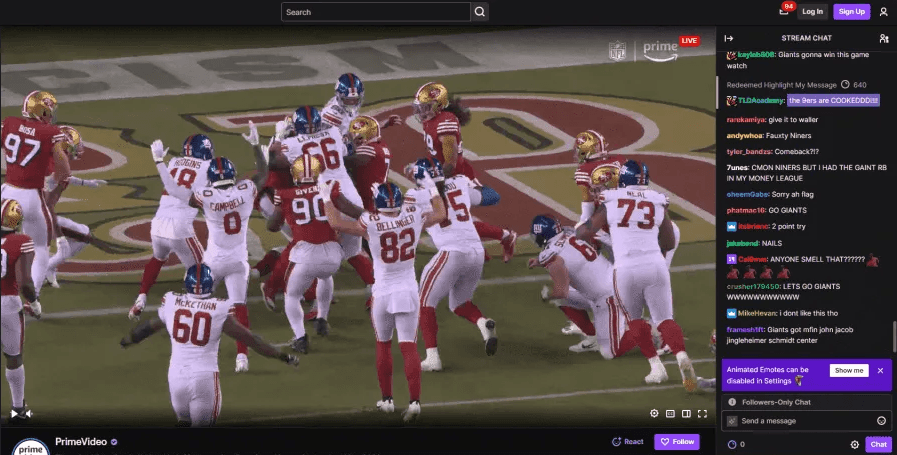
This rings true outside of Twitch, especially in sports. When I worked with the Prime Video team to program Thursday Night Football, our baseline research on the $1B/year deal told us the same story — community and social interaction are the underlying motivators for most NFL fans. And it's true across sports. The widely cited "Motivation Scale for Sport Consumption" tries to explain the reasons people watch sports, and it includes factors like social interaction, family, acquisition of knowledge, self-esteem and sense of empowerment.1 Other studies of live streaming off Twitch have come to the same conclusion2: live programming provides a sense of community. I also ran the growth strategy for Facebook's live daily game show and even though you could win real money by playing the game, we found the community strategy was the biggest driver of retention.
How can there be a community when I'm alone on my couch? It's somewhat parasocial. I once heard someone on Buzzfeed's live team describe the feeling as "collective anticipation" — there's a sense of shared experience, even if you're watching alone. Think about this example: Hardly anyone watches an NBA game the day after it airs. It's not just because of the spoilers (otherwise, nobody would watch anything the day after its premiere). It's because we have a need to watch the game together with the rest of the fandom.
In live programming, community is the deeper value proposition.
User experiences browsing live programming are influenced by community-seeking
When people browse for VOD content, they're mostly evaluating the type, genre, quality and length of the video.3 So if viewers looking for live programming seek more than just entertainment — perhaps community — how does that change how they browse?
In live discovery research at Twitch, the types of questions users ask while browsing include:
- Is the talent casual and humorous or more professional and tactical?
- Is this just beginning, in the middle of the action or coming to a close?
- Is this a tight/competitive game or blowout?
- Will I fit in with this community? Will I fit in with this fandom?4
People want to know about the personality of the host, where they are in the action and the energy of the stream. Those are questions people are trying to answer before they even click on a stream — mostly just trying to grok it all from a busy thumbnail. Even though YouTube and other services have jettisoned them, at Twitch, we surface tags and categories when you browse. That metadata helps answer those questions and improves the viewer journey.
People looking for live programming spend more time browsing than when they look for VOD content. It's because they're grilling merchandising more thoroughly for signals that I broadly bucket under one question:
What am I walking into?
Simply put, in VOD, a viewer is asking "what will entertain me?" In live, they're asking "what am I walking into?" On top of the content, people are evaluating a community, so their internal monologue sounds more like they're deciding between house parties than what to watch on Netflix.
The house party analogy makes sense. Wouldn't you want to know what you're walking into before you entered a random house party? That changes every step of the viewer journey. And since programming is all about content-market fit, making this work is what a quality live programming strategy needs to do.
A teardown of live discovery UX across streaming platforms
Let's take a look at some real live programming UIs from across streaming. I've pulled real live platform screen captures and merchandising from Netflix, Roku, Fox One, Prime Video and Paramount. I'm keeping my read high-level and focusing on UI and merch: 1) does this do a good job telling us what the content is? 2) do we have some context about the community we're about to walk into?
Quick note on scope and depth. These are public-facing teardowns from outside the organization, so I'm missing many layers I'd prefer to have — viewer segmentation, internal user research, company priorities, content and product strategy, production constraints. Still, we can think of these as mini case studies and see if they meet the mark on my two basic criteria: signals for content type and community context.
Roku's Sports Zone
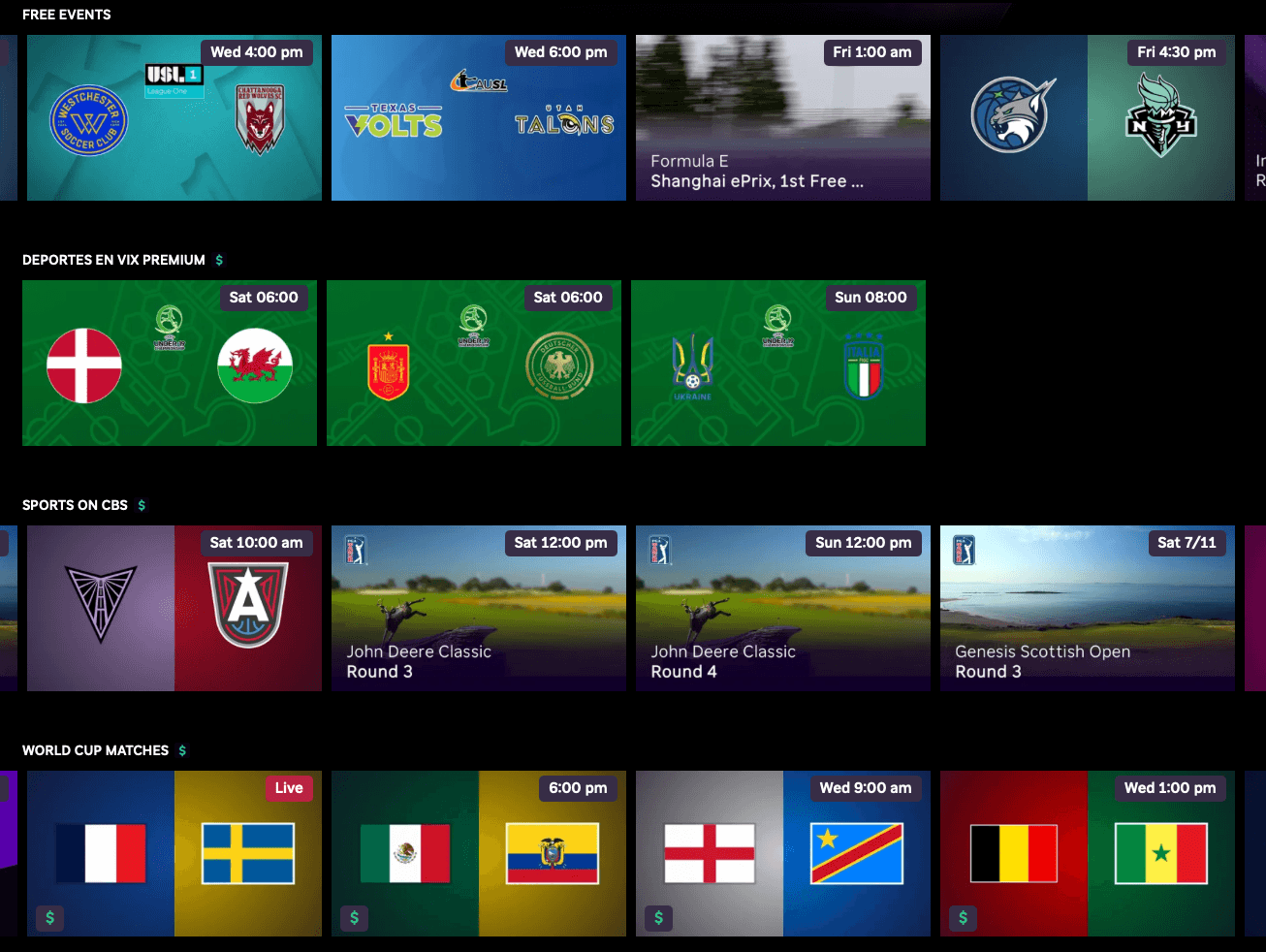
What you're seeing here is a wall of "Gracenote." Gracenote is an industry-grade provider of video metadata and especially in this case, provider of video imagery. Gracenote is a tremendously reliable source, especially for scale operations like Roku's here — Roku is trying to create a one-stop destination for all sports across all platforms (it goes without saying that fans are frustrated that sports are spread across multiple services and Roku is trying to solve that).
Gracenote is a giant video data supply chain. Its strength is standardization: these images are editorially neutral, verifiably "correct" and the rights are clean — but that standardization leads to its weakness. It's not the best merchandising. Netflix, most definitely, does not use Gracenote images; they design something bespoke for each event. And being totally fair to Roku, this "box art" is basically commodity imagery you will find across dozens of other services: Fire TV, Google TV, Tubi, Xumo, DirecTV, Samsung TV, Plex, Fubo, etc.
In order to figure out what to watch from a grid of Gracenote box art… you'd have to be an expert in international flags and obscure sports logos. We have an image here of logos for the Texas Volts and the Utah Talons… I don't even know what sport they play. (I just looked it up, it's pro softball!) I'm also a huge golf fan. But a photo of the John Deere Classic trophy is not exactly getting me invested in this weekend's PGA event. For franchise fans this is probably delivering as high-intent browsing ("quick scan for the matchup I know is on") but for any other new fans or curious viewers, we're not telling them what the content is, let alone giving them a glance at the community.
Deeper dive: FIFA World Cup 2026 merchandising comparison

At the bottom of Roku's Sports Zone is their World Cup row (see above). Take a look at the upgrades Prime Video and Fox One made to go further than the Gracenote imagery (below). Fox One has the English-language media rights for all of the games so they're obviously incentivized to make these great. Prime Video allows you to subscribe to Fox One within their store.
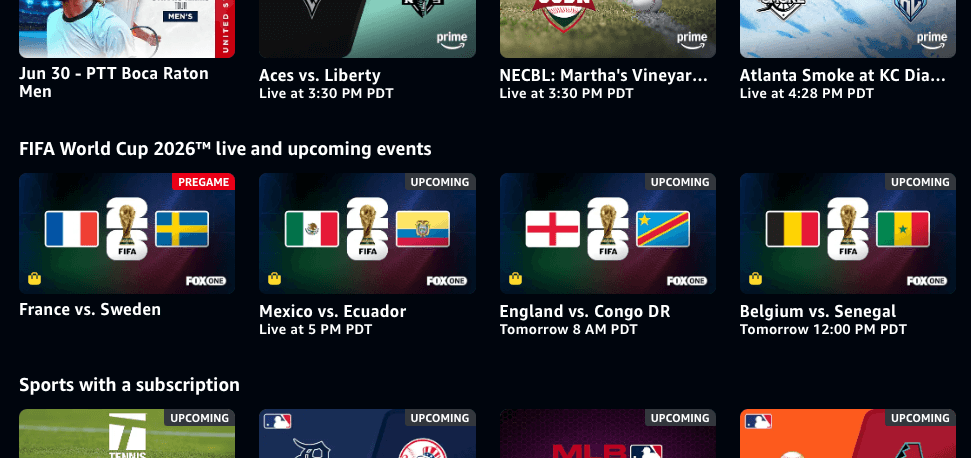
On Prime Video, look at that little red metadata badge that Amazon piped in — it tells us this match is currently airing the pregame! That literally directly answers a question we know browsing viewers are asking. Think of how much better that experience is from that little tiny bit of context: without it, I would be clicking on a soccer game only to be dropped into the middle of a… talk show. Not the best experience. But now that I know it's the pregame, expectations are set. That kind of merchandising is exactly what I pushed for running Twitch's Thursday Night Football program as part of Amazon's $1B/year NFL deal.
I don't know where the main creative asset is coming from but I assume it's Fox One — it's still two flags like Gracenote's but at least they add the FIFA logo with '26 on it, which tells us the sport and the tournament.
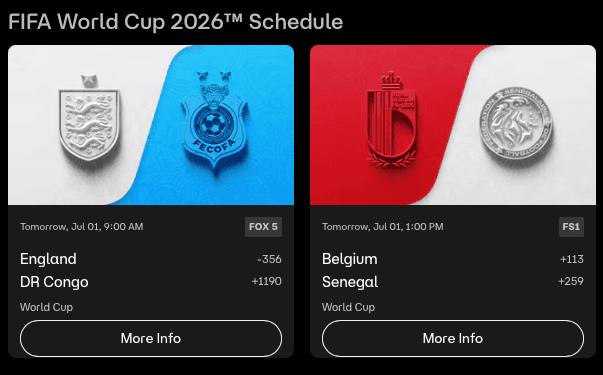
Ok, now check out what Fox One is doing on their service. I don't love the embossed logos (it might actually be harder to decode embossed soccer team shields than colorful country flags!) but they're including betting odds right alongside the game! What a great idea. A viewer who might know very little about the teams can now understand what kind of energy these games will have: if DR Congo beats England, that will be a huge upset (they didn't). Whereas Belgium vs Senegal could be a pretty close game (it was!). Betting odds are a quick way to tell someone sports-savvy whether this could be a cinderella story or go into penalty kicks.
Netflix's WWE Shelves
I would summarize Netflix's merchandising strategy for WWE events as: "shirtless guys who don't smile." That actually gets us surprisingly far toward signaling what we want to viewers: drama, spectacle, fighting, masculinity. You get a sense of what the content is and a feel for the big personalities in this community.
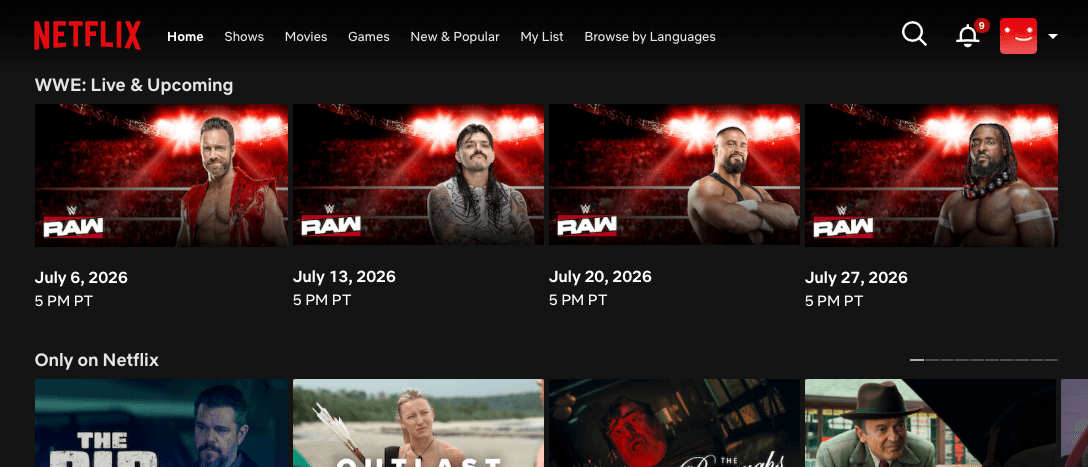
The missed opportunity in the art is in repetition of the same backgrounds and text. That background certainly signals that this is a sport-like event but it could say more with each variation (perhaps we see the ring or a better look at fans cheering). The "RAW" logo is also repeated which probably means a lot to fans but is lost on the average Netflix member.
Overall, I think this could capture core devoted WWE fans but it still stops short of conveying who the matchups are; action shots of fighting or stars trash talking would say even more. For new viewers, you get some sense that it will be edgy and mean, but it doesn't quite convey the craziness of a WWE match. Imagine clicking this out of curiosity and then entering the stream in the middle of a violent bodyslam.
Paramount's UFC
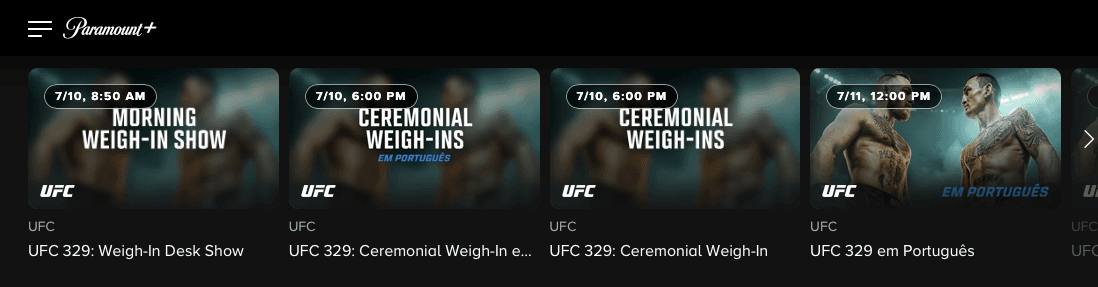
There's a lot of redundant information here.
- I'm already on a UFC browse page and then for each title, I'm being told it's the UFC again three more times: in the thumbnail, below that in text, and below that in the title.
- Text on the thumbnail repeats again below it in the title ("Ceremonial Weigh-Ins").
- The titles all reference 329 (do UFC fans even know the numbering of each individual event?).
- It looks like each feed in different languages is available as its own stream, so all of those options are here too.
I have to assume the sheer number of events, localized versions and shoulder content is creating bottlenecks to generate assets at Paramount+. Zooming out, what they really should be doing at the minimum is using the names and images of the fighters to tell us what's happening ("show don't tell" as they say). When they do show the fighters, in the 4th tile, it's hard to see.
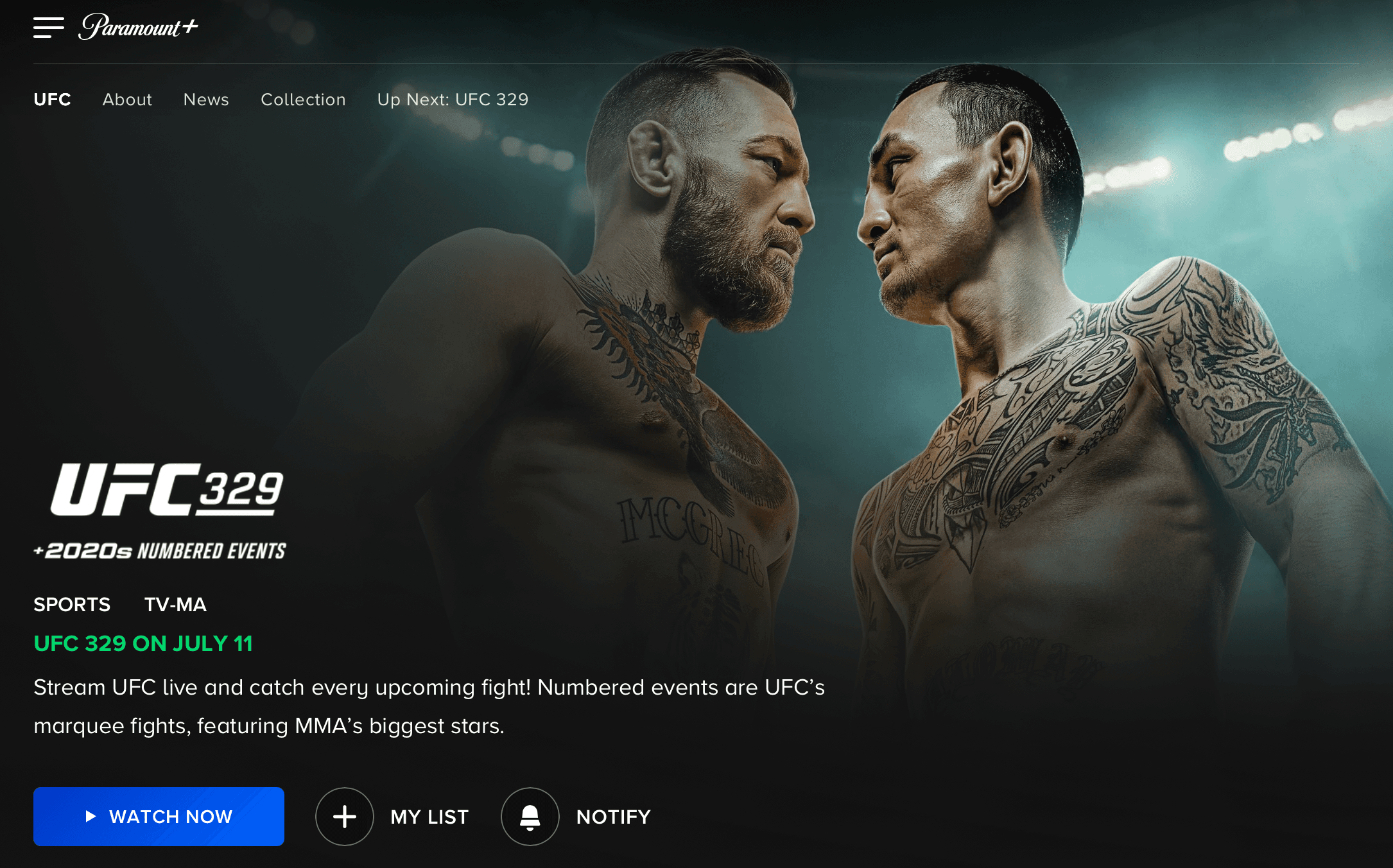
When we click into the fight page, the key art is fantastic — similar to the WWE images, they're using their celebrities and the face-to-face position tells us it's a fight. It's weird that the blue call to action button is "watch now," which brings us to a VOD match that already happened, not the one being merchandised (which is weeks from now).
What's next for live programming on streaming apps: Dynamic merchandising and First Time Live Viewer Experience
The future of streaming will require more strategies and product design choices that recognize live programming for what it is: a fundamentally different viewing experience with different demands.
For a moment, I'll leap to solutions, just to give a sense of what more can be explored.
Dynamic live merchandising
Overall, we need to work toward merchandising that changes and evolves during live events. I call this dynamic live merchandising. Dynamic live merchandising uses real-time imagery and metadata from a live program — such as the current segment, score, talent on screen, topic, crowd moment, or automatically captured stream thumbnail — to update how that program is represented in browse and discovery surfaces. The best example of this in my teardowns is when Prime Video told us a soccer game was having its pregame show.
Here are some examples:
- Boxing, UFC & fights — It's tempting to use the key art from the main event but these multi-hour streams build up, starting with prelim events. Dynamic live merchandising would show us imagery that represents the current fight. High-intent fans understand there are undercard events and new fans will get a better feel for what they're walking into.
- Comedy & live concerts — Similarly, there's a "headliner" or celebrity being roasted. That person is certainly A-list and attention-grabbing in artwork. But think about how dynamically merchandising each individual musician or each comedian could build a big tent. For each set, we can merchandise the comedian who's on stage and bring in their fans for a moment. It's a disorienting experience the other way around: to click on a headliner and feel "switched" to an opening act.
This is a lot of work and it's demanding for live programming teams but those of us who've programmed live know what it's like to be in the war room already. As an alternative, the simplest scalable implementation that actually works is what we did at Twitch: an auto-generated live thumbnail, a snapshot taken from the screen every 5 minutes.5
First Time Live Viewer Experience
We know how crucial the first moments of a video are. YouTube suggests optimizing the first 15 seconds of a video. Snapchat used to preach a hook for viewers in the first 6(!) seconds.
So why don't we try to optimize how new viewers enter a live stream? Broadcasters used to do this all the time — turn on NPR and you'll still hear the host occasionally remind us who's talking and what the show is "for those of you just tuning in."
Similar to what designers call a First Time User Experience (often called FTUE), we need to design and experiment with short concise devices that onboard unfamiliar viewers into a live stream. Curious would-be fans are tuning in to new Olympic sports they've never heard of, comedy specials after inside jokes are already established, or NFL games during halftime — the exact discovery problem I got familiar with running TNF at Twitch. We can design First Time Live Viewer Experiences (FTLiViE!) that get them up to speed, give them situational awareness and invite them into the community. I've seen this move meaningful business metrics at Twitch6 and when we tested onboarding flows on Facebook's live daily game show.
It doesn't have to be a disruptive "video recap" before you join the action (although it could!). It can be a layer below the video like player controls or even a lower third burned into the video when the broadcast team knows promotional levers are being pushed.
These specific proposals aren't the point.7 We've walked through the value prop of live, user research and browse behavior which led us to discovery UXs and merch that don't quite meet the mark. Live programming is its own discipline with a different customer. So we need to get creative and drive new solutions. As sports, events and comedy slowly migrate to streaming, we're only at the beginning of developing the right product strategy and design approaches that harness live programming — a special form of video that does much more than entertain.
Footnotes
-
Like Twitch, they also include escape and drama. But one more factor also plays a role: physical attractiveness! ↩
-
This one looked at live selling/commerce streamers in China — which would seem to be highly informational and innately transactional — and concluded that audiences continue watching streams because of a "sense of community, interactivity, and emotional support." While you're here, there's another older study that found Twitch streams serve as "virtual third places, in which informal communities emerge, socialize, and participate." ↩
-
This study breaks VOD browsing into 8 criteria viewers look for: content type, genre, length of program, freshness, previously viewed, number of seasons, commercials, ratings/reviews. ↩
-
I know that Twitch is an interactive platform built around creators and it's predominantly video games but it's easy to see how those questions could apply to all forms of gaming, including live sports. ↩
-
The consequence of this is that streamers have to use the stream itself to merchandise their content. I once met a music streamer who reverse-engineered when Twitch grabs the live thumbnail and built a program to optimize which camera and graphics displayed during those moments — thus, letting him control the thumbnail. ↩
-
Some of the most successful TikTokers that migrated audience to Twitch had methodical onboarding strategies to engage fickle TT viewers with the Twitch product (which is a little difficult for first-timers to follow). The TT creator would go live on both platforms simultaneously and persistently drive audience from TikTok Live over to their Twitch stream. Once the viewers were there, they would give them a "tour" of Twitch. They would literally walk through each Twitch product function around the video, pointing at each element around them. But the money moment was the last step: their call to action was for new viewers to say "yo!" in chat so that the community could welcome them. The hook for new viewers was to bask in the affection of the community — but chatting with a channel pushes new viewers through the sign-up process which is essential to subscribing and staying retained as a long-term viewer. So, manually doing their own First Time Live Viewer Experience and creating social pressure to chat boosted that streamer's ability to bring new viewers back to subsequent live streams. ↩
-
I also didn't dive into live interactivity and community features — chat, alerts, predictions, co-viewing, live shopping mechanics. All are real levers in live UX that deserve their own experiments. ↩